
One timeline, every clip
Frame-accurate scrubbing with a SMPTE-style readout and longest-clip-wins duration, so a sync conversation can name an actual frame instead of "about halfway".
Not another video player. Drop the whole delivery on one canvas, scrub a shared frame-accurate timeline, pin notes where the problem is, and sign the package off before it goes to playback — without opening After Effects.
Included with Solo & Team
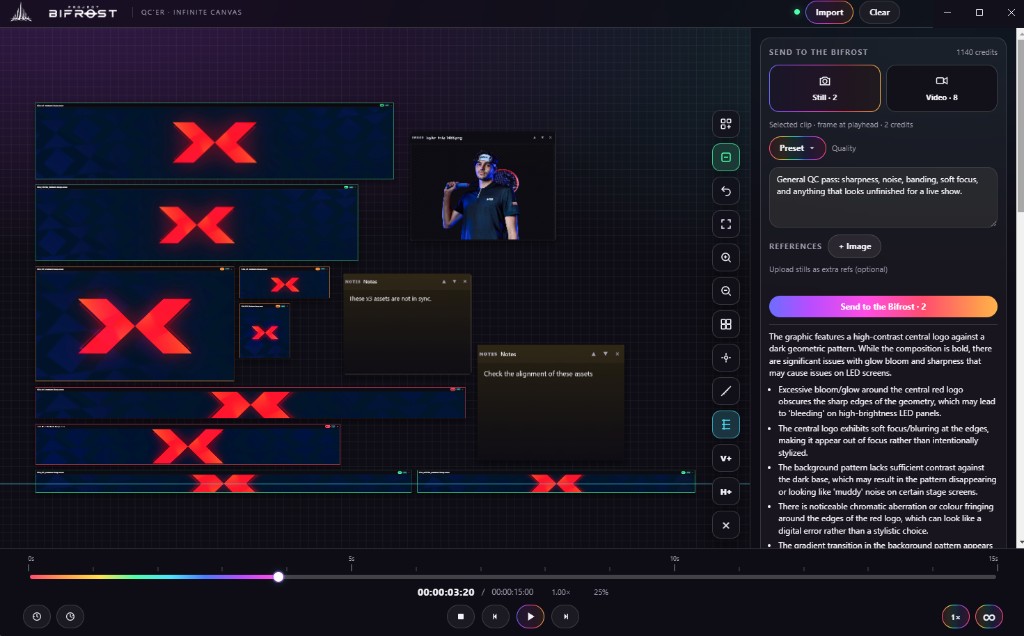
QC'er is a standalone Windows app — no After Effects licence, no plugin chain, nothing for a producer to install beyond the one app.
Import HAP, MOV, MP4 and stills. Arrange them the way they sit on the actual wall — upstage ribbon, side panels, IMAG — with magnet snap keeping the layout tidy under deadline.
Play everything against one frame-accurate timeline. Step frames, pin notes beside the problem, drop reference logos in to compare, and mark each clip green, orange or red.
Run a still or a video range through a QC pass and get a written report back in the panel — bloom, banding, soft focus, chromatic fringing, safe areas, spelling.
Live events and large-scale projects need more than a media player. The person approving the package shouldn't have to borrow a motion designer to look at it.
Frame-accurate scrubbing with a SMPTE-style readout and longest-clip-wins duration, so a sync conversation can name an actual frame instead of "about halfway".
Pin a note next to the asset it belongs to. Feedback stops living in a separate email thread that nobody can map back to the media.
Drop the approved logo or brand sheet straight onto the canvas and compare side by side at full resolution.
Assets align to each other cleanly, so the canvas keeps reading like the stage plan even after twenty revisions.
A structured second opinion on stills or ranges — 2 credits for a still, 8 for video — drawing on the same shared account pool as the panel.
Install once. When we ship, QC'er updates itself — no chasing installers around the office before a show.
A show isn't a file. It's a package of them that has to agree with itself — same grade, same timing, same spelling, on screens of wildly different sizes.
A generic player
QC'er
Plays one file at a time
Whole package on one canvas, laid out like the wall
Notes live in email or a spreadsheet
Notes pinned to the media they describe
No shared status
Traffic-light marks readable at a glance
HAP support is hit and miss
Built around HAP delivery for playback systems
You are the only quality check
Bifrost QC pass flags what tired eyes miss
Solo
One QC'er key, intended for one machine. Activate on your computer and you're set.
Team
One shared key for the whole crew, with concurrent-machine limits — so the show can review without juggling personal installs.
QC'er uses a separate key from the After Effects panel — it starts with PBFQC-. Subscribe to Solo or Team and the key is minted alongside your panel seats, ready in your dashboard.
Credits for The Bifrost come from the same shared account pool as the panel — a still costs 2, a video pass costs 8. No second subscription to manage.
Install once, update from inside the app, and bring the whole crew onto the same canvas.
Windows & Mac · Requires a Solo or Team plan